Exploring SVCMON Points
The default view in the CygNet ServiceMon Administration utility is Explore. From this view you can see all configured SVCMON points. For each point the utility displays the following properties: ServiceMon Point, Uniform Data Code, Description, CVS Value, Units, General 1, General 2, Calc Type, Timer, Timestamp, and Domain.
|
Exploring SVCMON Points |
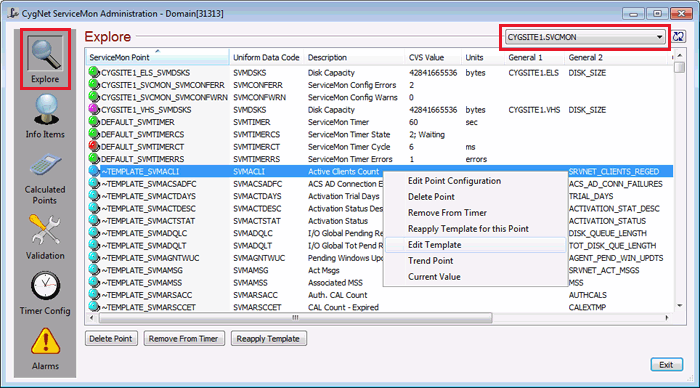
Select the points to which you want to modify. Press Ctrl+Click to select multiple items. You can sort or reverse sort items in a column by clicking the column heading.
Buttons
Select one or more points in the Explore view and use the buttons to perform selected actions.
| Button | Description |
|---|---|
|
Delete Point |
Delete the selected points from the PNT. You also have the option to delete the point(s) from the VHS. |
|
Remove From Timer |
Unassign the selected points from the associated timer. See Associating SVCMON Points with Timers. |
|
Reapply Template |
Click to reapply a point's template configuration to a SVCMON point. See SVCMON Point Templates. |
Context Menu
Select a single point in the Explore view and right-click to perform selected actions.
| Item | Description |
|---|---|
|
Edit Point Configuration |
View the point configuration for the selected point. Or double-click to invoke the point configuration. |
|
Delete Point |
Same as button. |
|
Remove From Timer |
Same as button. |
|
Reapply Template for this Point |
Same as button. |
|
Edit Template |
View the template configuration for the selected point. Or double-click to invoke the template configuration. |
|
Trend Point |
View a trend for the selected point. See Trending SVCMON Point Values. |
|
Current Value |
View the current value for the CVS record on the Point Properties dialog box. |
More:


